Call Sales: +91 7519024625 +91 7519024625Customer Support
MpxHR
Windows 10 / 11 100% Offline App · v4.6.0

Payroll, attendance & HR for Windows PC

MpxHR Enterprise is complete offline HR software for 64-bit Windows: employee records, attendance, PF, ESI, TDS, Form 16, KPI scorecards and SOPs. Your data stays on your own computer, with no monthly cloud fee.

  • Windows 10/11
  • 100% offline
  • 14-day trial
  • Lifetime plan
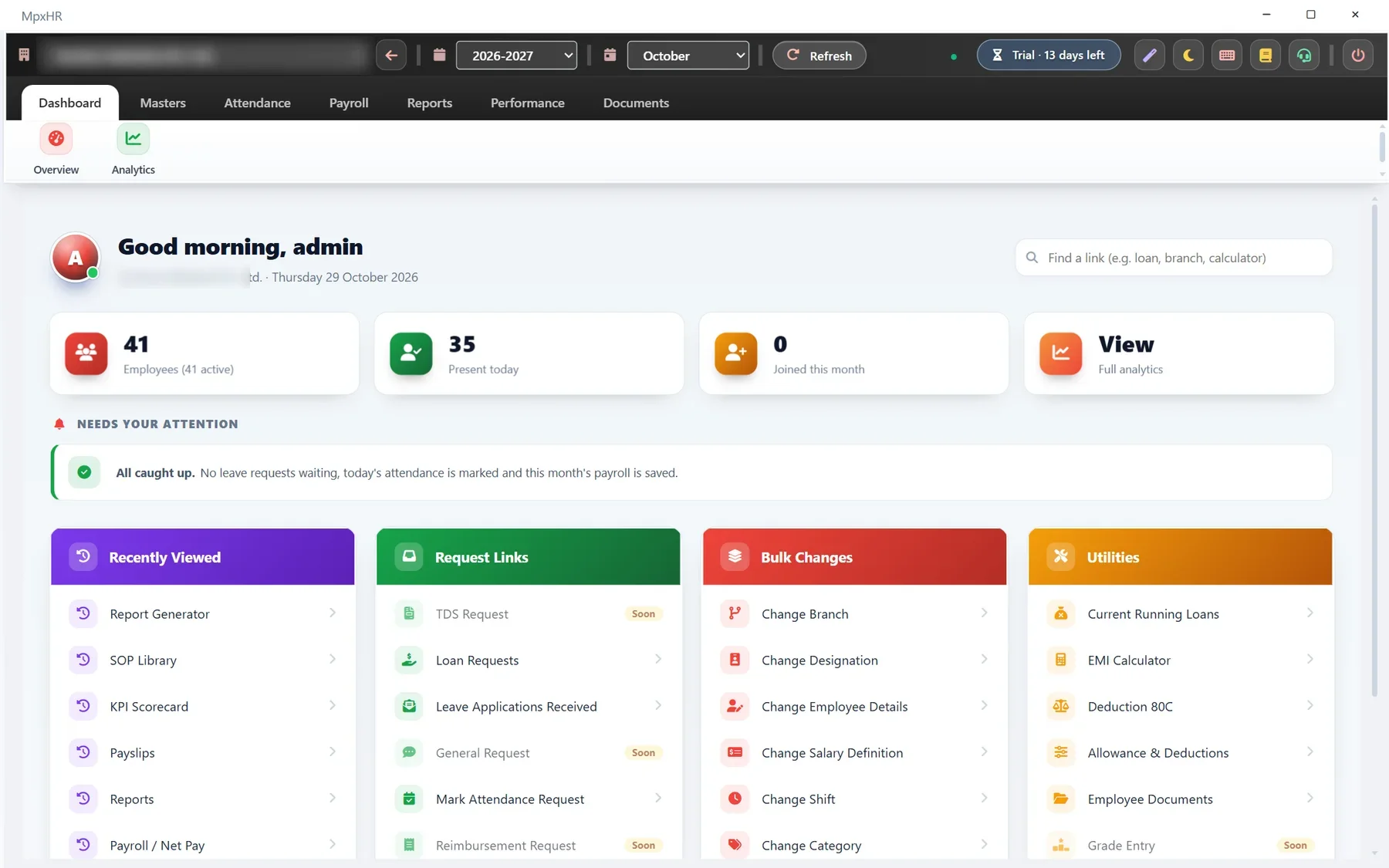
MpxHR dashboard
PF · ESI · TDS KPI Scorecard new Editable Word payslip
Offlineworks without internet
14 daysfree trial, 50 employees
₹3,360per year to start, 40% off (limited time)
EN + हिंदीsupport in your language

Trusted by growing businesses across India

Manufacturing & Factories CA & Tax Consultants Logistics & Transport Retail & Showrooms Schools & Institutes

Why choose MpxHR?

Your data, your computer

Nothing is uploaded to us. Backups and restore are in your hands.

No monthly cloud bill

Pick a yearly plan, or pay once for Lifetime and use it forever.

Never locked out of your data

If a license ends the app turns view-only: you can still view, print and export everything.

Fast and simple

Built for HR staff, not IT teams. Most people are productive on day one.

Help in Hindi and English

Setup, data import and training support over WhatsApp, phone or email.

Connects when you want it

Optional Email and Google Sync, used only when you switch them on.

Modules

HR work, grouped the way HR does it

Six modules, all included in every plan.

Core HR

Every employee, one clean record.

  • Employee records with photo, signature and documents
  • Departments, designations, branches and categories
  • Joining checklist and a Joiner Form they fill on a phone
  • Offer, appointment and experience letters
  • Promotion, transfer and increment history, exit and full & final
  • Your own fields and tables, no coding
See details

Attendance & leave

Mark it once, and payroll already knows.

  • Monthly colour-coded grid and daily attendance
  • Import many months from Excel with a preview
  • Shifts, rosters and holiday calendar
  • Leave types, balances and approvals
See details

Payroll & compliance

Right the first time, every month.

  • Any number of earning and deduction heads
  • PF, ESI, professional tax, TDS and loan EMIs
  • Loss of pay day by day (actual, 26 or 30 days)
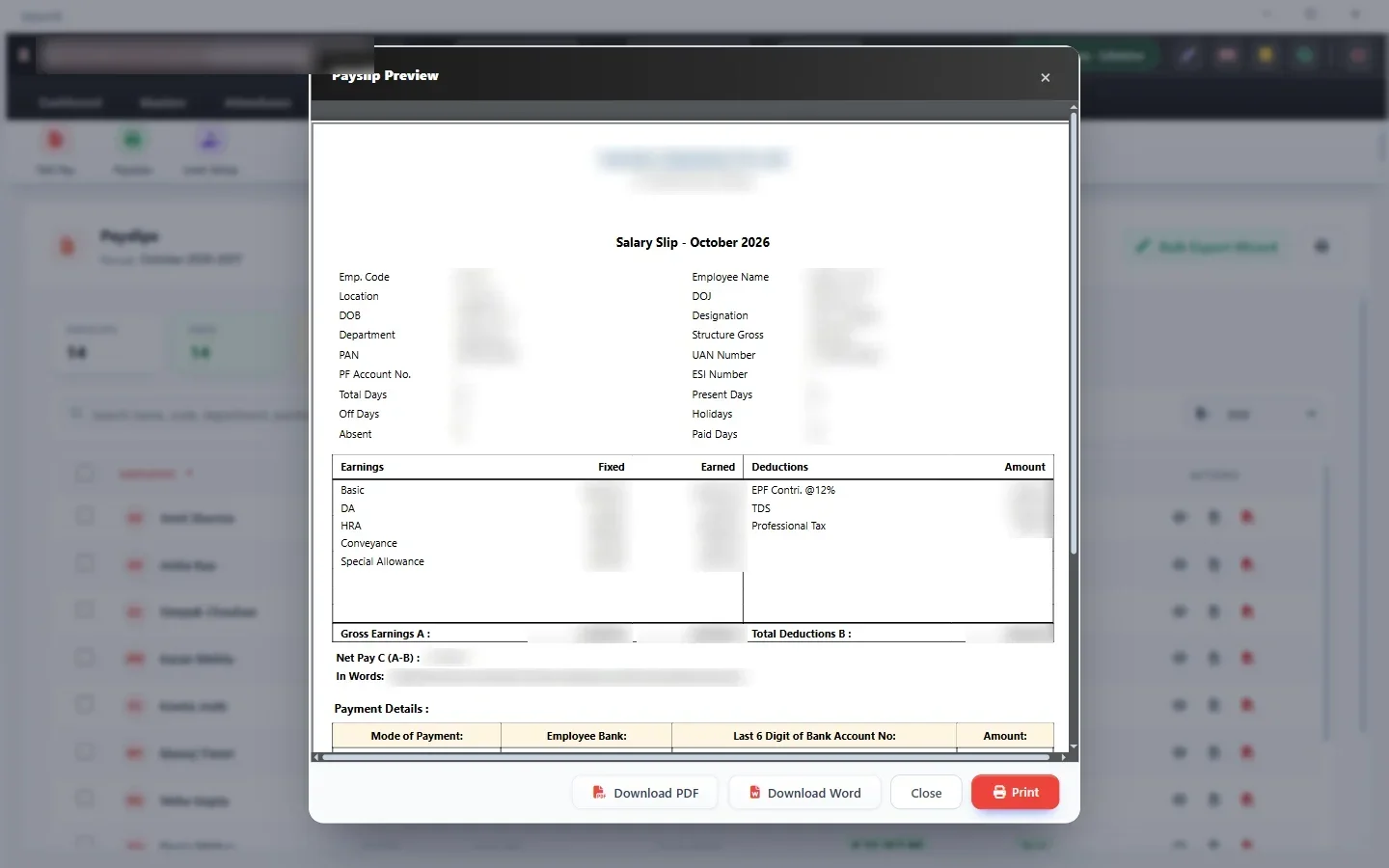
  • Payslips: PDF, editable Word, print or email
  • Form 16 and a Payslip Designer
  • Month approval and lock, password protected PDF payslips
See details

Performance & policiesNew

Measure results. Keep everyone on the same procedure.

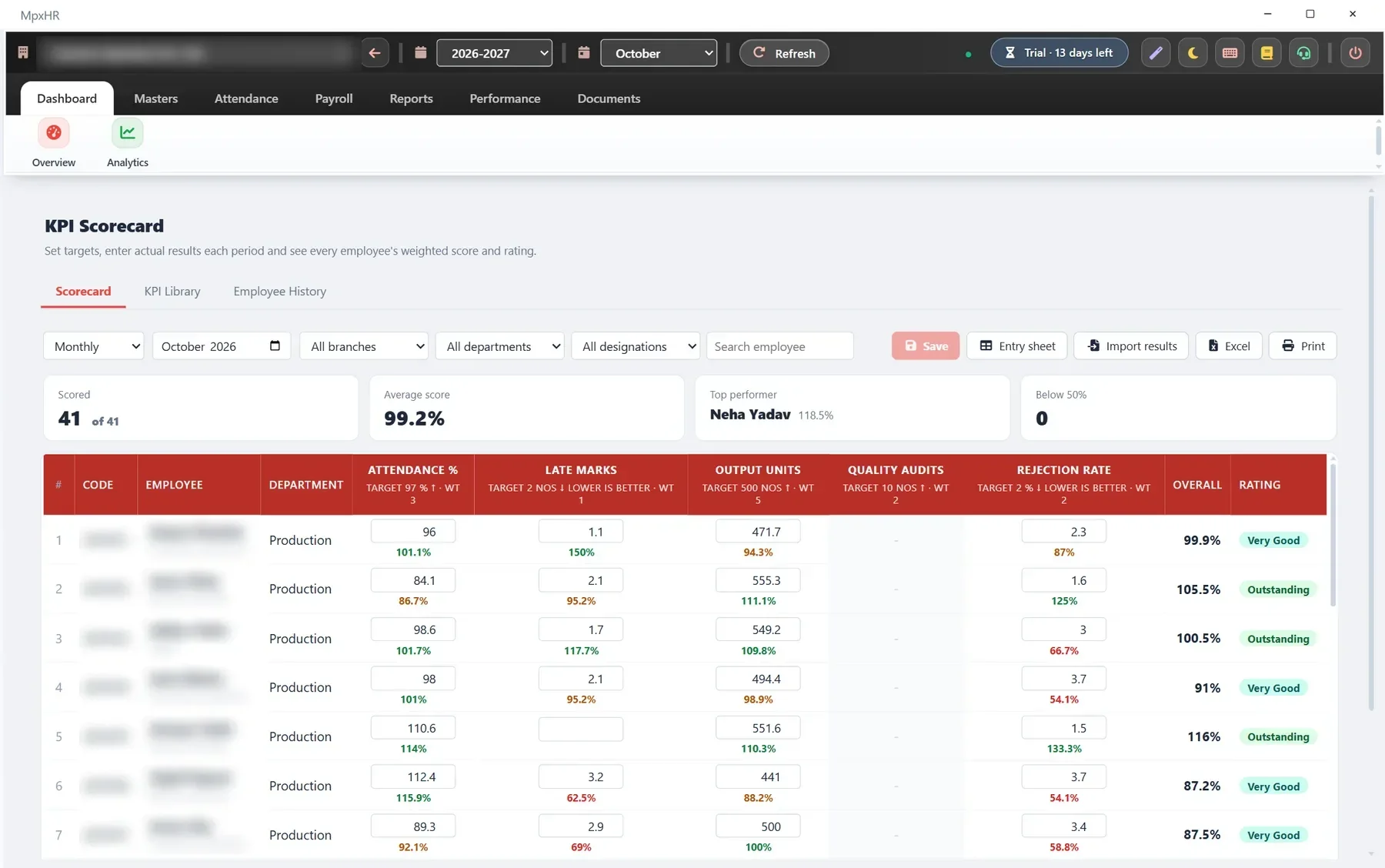
  • KPI Scorecard: targets, weights, weighted score and rating
  • Monthly, quarterly or yearly results with history chart
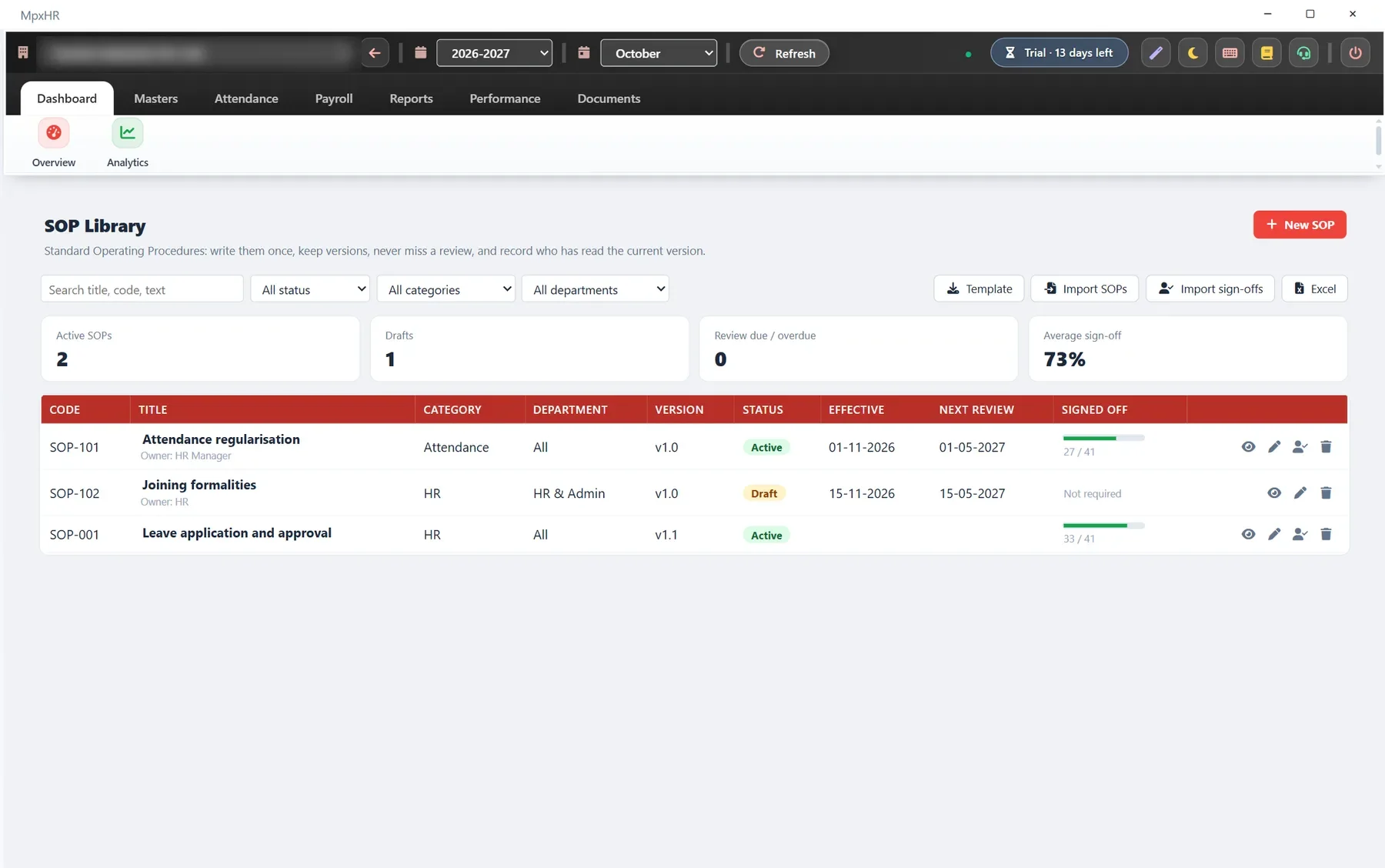
  • SOP Library with versions and review reminders
  • Sign-off sheet of who has read the current version
  • Fill from Excel, a Google Sheet or from attendance
  • Appraisal cycles with ratings and increment slabs
See details

Reports & analytics

Answers in a click, in the format you need.

  • Dashboard with what needs attention today
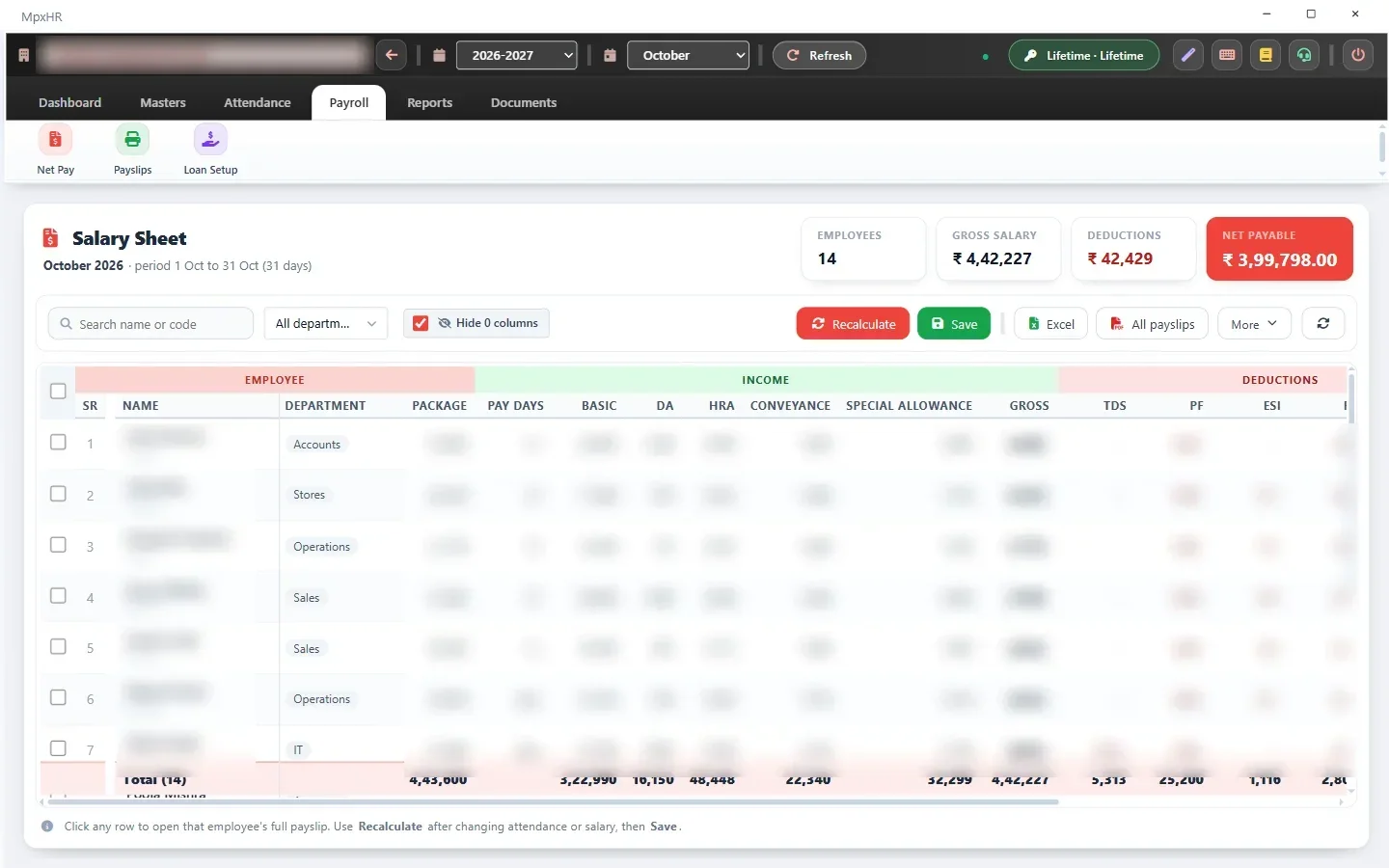
  • Salary sheet, PF / ESI, bank advice, TDS and more
  • PF ECR, ESIC sheet and bank transfer file, muster and wage registers
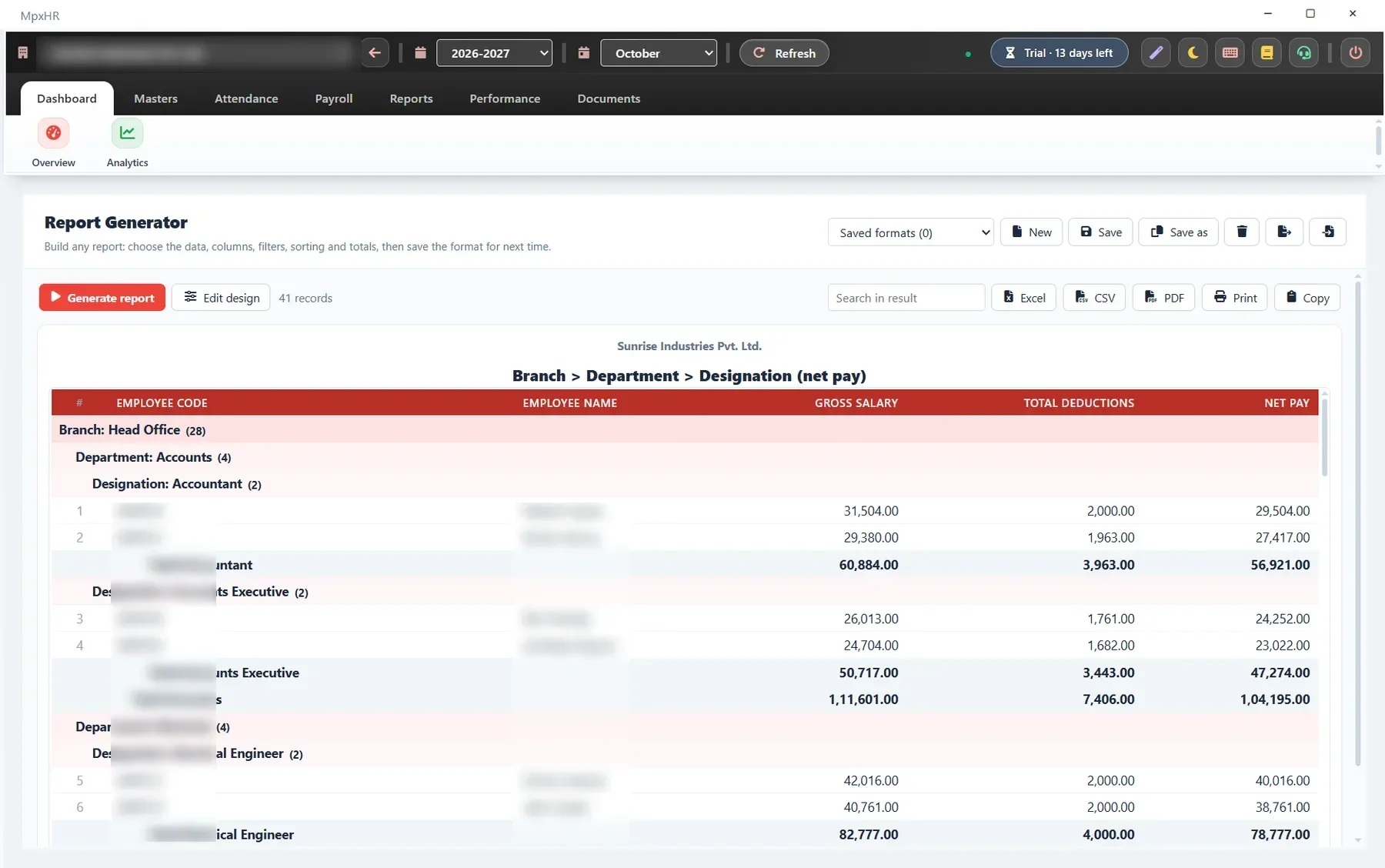
  • Report Generator: pick columns, group three levels deep, add totals
  • Export to Excel, CSV or PDF; save the format
See details

Connect & protect

Works with your tools. Keeps your data yours.

  • Google Sheets, Forms and Drive, with an approval queue
  • Email payslips and letters (Gmail, Outlook, Zoho)
  • Admin, HR, Payroll and Employee roles
  • Audit Trail, Activity Log, backups with a Google Drive copy
  • 100% offline: data stays on your computer
See details
Product tour

See it working

Real screens, with demo data.

MpxHR dashboardSalary sheet with PF, ESI and TDSPayslip previewKPI Scorecard with weighted scores and ratingsSOP Library with review dates and sign-offReport Generator with multi-level grouping

Up and running in three steps

Install

Run the installer. Your 14-day trial starts automatically.

Bring your data

Import employees and attendance from Excel, with a preview before saving.

Run payroll

Create payslips and reports in a click and email them to your team.

Data Safety & Privacy

Your payroll data is 100% private & safe

Offline architecture means zero risk of cloud breaches or unauthorized access.

Encrypted local database

Employee records, salaries and bank details remain encrypted in a local database file on your PC. No data is ever uploaded to our servers.

Automatic daily backups

Automatic backup created every time you close MpxHR. Keeps multiple dated copies, with optional 1-click sync to your Google Drive.

Fast safety restore

PC crash or upgrade? Install MpxHR on any new Windows laptop, enter your license key, and restore your full data in under 2 minutes.

Works with the tools you already use

Excel and CSV import / export Google Sheets Google Forms Google Drive links Gmail, Outlook and Zoho Mail PDF and Word documents Hindi and English
Customer reviews

Trusted by HR teams and CAs across India

Real feedback from businesses, factories, and payroll consultants using MpxHR.

★★★★★

“Calculating PF, ESI and loss of pay for 80+ factory staff used to take 3 full days in Excel. With MpxHR it takes just 20 minutes, with zero calculation errors.”

R
Rajesh Sharma
Operations Director · Precision Auto, Pune
★★★★★

“We manage payroll for 14 client companies. The multi-company feature, automatic Form 16, and direct PF ECR text file export make MpxHR unbeatable at this price.”

A
CA Amit Agarwal
Tax & Payroll Consultant · New Delhi
★★★★★

“The offline security is what sold us. No monthly cloud bills, no internet dependency, and our employees' salary data stays strictly within our office PC.”

P
Pooja Verma
HR Head · Shree Krishna Textiles, Surat
Pricing

Simple, honest pricing

Every feature in every plan. Limited-time introductory offer: 40% off right now.

Prices exclude GST. Enterprise and CA / Consultant plans are quoted on request.

Questions before you buy

Does MpxHR need the internet?

No. Daily work (employees, attendance, payroll, payslips, reports) is fully offline and your data stays on your computer. The internet is used only by the optional Email and Google Sync features, and nothing is ever sent to us.

What happens after the 14-day trial?

You enter the license key from us and carry on with all your data intact. Without a key the app switches to view-only mode: you can still view, print and export everything, but cannot add or change records until a key is entered.

What is the difference between the yearly plans and Lifetime?

Yearly plans (Starter, Business, Enterprise, CA / Consultant) run until a date and are renewed with a new key. After a yearly plan ends there is a 15-day grace period. Lifetime is a one-time payment with no expiry date and no employee or company limit.

How does the license key work?

The key is a signed text code. You paste it in Settings › License and it is checked on your computer, with no internet needed. It is not tied to one computer, so you can move the software to a new PC and re-enter the same key.

Can I upgrade later if I add more employees?

Yes. Ask us and we issue a new key with the higher limit. Your data stays as it is. Renewals simply extend the date.

Is my data safe?

Data is stored in a database file on your computer. You can take backups at any time, restore them, protect access with roles and passwords, and use the master recovery password if an admin password is lost.

All questions

Try MpxHR today

All features for 14 days, up to 50 employees. No card and no sign-up.

Need help setting up MpxHR?

Installation, data import and training in Hindi and English.

Chat on WhatsApp
Download